Rhino.Inside.Revit: Transactions, Type-Wrapping, and Placing Families from Grasshopper
Getting Grasshopper to place Revit family instances and build Assemblies through GHPython sounds simple until the Transaction fails silently and the geometry you passed in isn't the type Revit expected.
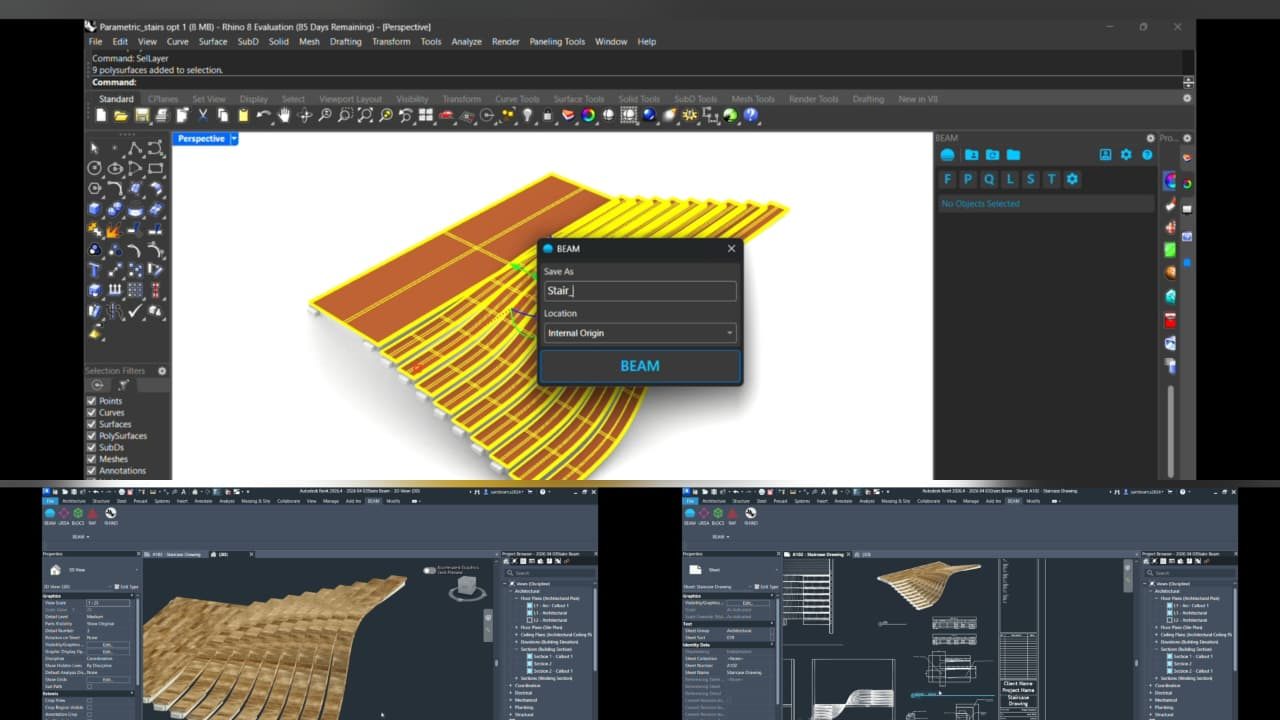
A BEAM-based Rhino to Revit workflow (Rhino geometry exported as a Revit family, opened in Revit). BEAM is a separate, no-code tool from MKS DTECH, different from the scripted Rhino.Inside.Revit approach this post covers, shown here because the underlying problem, getting Rhino geometry into Revit as real BIM data, is the same one.
Rhino.Inside.Revit is genuinely powerful once it's working. You get Grasshopper's parametric logic driving live Revit elements, no round tripping through import and export. But the path from this works in a Python console to this works reliably inside a Grasshopper definition has a few specific traps that cost real debugging time. Mostly around two things: how Revit's Transaction model expects to be used, and how loosely typed Grasshopper data needs to be coerced into the exact Revit API types a method expects.
Worth being upfront about what the cover image on this post actually shows. It's a stair definition going from Rhino into Revit through BEAM, a plugin from MKS DTECH that handles the Rhino to Revit handoff through a UI panel instead of code. It's a different tool from what this post is about, but the underlying problem, getting Rhino geometry into Revit as usable BIM elements, is the same one. If you'd rather not write and debug the Transaction and type-wrapping code below yourself, BEAM is a real no-code alternative worth knowing about.
Why placing a family instance isn't just one API call
The naive version, call NewFamilyInstance with a location and a family symbol, fails immediately if you haven't done two things first. Activate the FamilySymbol, since Revit loads family types lazily and an inactive symbol can't be placed. And wrap the whole operation in a Transaction. Skip the Transaction and Revit either throws immediately, or worse, appears to succeed in session but never actually commits, so the instance vanishes the moment the document is touched again.
The Transaction pattern that actually holds up
The pattern that stopped causing silent failures: open the Transaction, activate the symbol if needed, place the instance, set any type or instance parameters while still inside the same Transaction, then commit. Splitting parameter setting into a second Transaction after commit sounds harmless but occasionally raced against Revit's own regeneration cycle, and produced instances with parameters that silently didn't take.
with Transaction(doc, "Place Family Instance") as t:
    t.Start()
    if not symbol.IsActive:
        symbol.Activate()
        doc.Regenerate()
    instance = doc.Create.NewFamilyInstance(point, symbol, level, structuralType)
    instance.LookupParameter("Comments").Set(comment_value)
    t.Commit()
One Transaction, start to finish, including parameter writes. Fewer moving parts, fewer places for a regeneration cycle to land between two operations that were supposed to be atomic.
Type-wrapping: the quieter failure mode
The second recurring issue was subtler than a crash. Grasshopper geometry, points, curves, planes, doesn't automatically become the Revit API type a method signature expects. A Grasshopper Point3d needs to become a Revit XYZ. A Rhino plane needs to become a Revit Plane through its own constructor, not a cast. Methods that expect an XYZ will often accept something that looks close enough in a dynamically typed script, and either throw a type error deep in the Revit API, or worse, accept it and produce geometry that's subtly wrong. Flipped, offset, or in the wrong coordinate space entirely, because Rhino.Inside.Revit runs Grasshopper's world in Rhino's coordinate system while Revit expects its own.
The fix was disciplined and a bit boring, but it worked. Every value crossing from Grasshopper geometry into a Revit API call goes through an explicit conversion function, never an implicit one, and every coordinate gets checked for which system it's actually in before it's used.
Building Assemblies, not just instances
Once individual family placement was reliable, the next layer was grouping placed instances into Revit Assemblies through GHPython. Useful for anything that needs to move, schedule, or document as one buildable unit rather than a scatter of individual elements. AssemblyInstance.Create takes a document, a list of ElementIds, and a category, and the main gotcha here was the same Transaction discipline as before. Creating the assembly and setting its naming or parameters needed to happen inside one Transaction, not split across the creation call and a later update.
What this is worth knowing before you start
If you're building a Rhino.Inside.Revit workflow, wrap each logical operation in exactly one Transaction, do all related parameter writes inside it, and never let Grasshopper geometry cross into a Revit API call without an explicit, checked conversion. Both of those sound obvious written down. Neither is obvious the first time a symbol silently fails to activate or a coordinate lands thirty feet from where it should.